
Balding AI publishes this comparison and makes one of the apps in it.
Most people who try to track hair loss start with a folder of phone photos and a hope that the trend will reveal itself. It rarely does. Lighting shifts, camera angles drift, and your own mood colours what you see, so two months of photos can leave you no surer than when you started. A real hair loss tracker app removes that guesswork by standardizing how you capture your scalp and scoring the change for you. This guide ranks the main options in 2026, explains how the apps actually work, and shows you how to tell whether you are balding before the changes become obvious.
TL;DR
- Balding AI is our top pick for guided photo capture, 0-10 density scoring, progress history, and export controls.
- Manual photo logs and generic gallery apps are better than memory but still leave interpretation to your unreliable eyes.
- To tell if you are balding, map your hairline against the Norwood scale and track crown density photos over 8-12 weeks.
- The best app gives you guided capture, zone-specific scoring, multi-week trends, and an exportable report for your doctor.
Important
This article is educational and not medical advice. If you are worried about sudden shedding, scalp symptoms, or side effects, talk to a licensed clinician.
Skip the guesswork: get an objective density score
Balding AI is free to start and your first AI score takes about 30 seconds. It presents 0-10 scalp scores, stores them in a progress history, and lets you export or delete your data.


How do hair loss tracker apps work?
Hair loss tracker apps work by turning your scalp into a series of repeatable measurements instead of a memory you try to recall. The simplest versions store dated photos in a gallery. The more capable ones add guided capture, so the front, sides, and crown are shot from the same angle every session, then analyze each image to estimate density and coverage. The output is a number or a trend line rather than a feeling, which is what makes week-to-week comparison reliable.
The reason this matters is biological. Androgenetic alopecia progresses slowly through follicle miniaturization, where each hair cycle produces a slightly thinner strand. That change is too gradual for daily observation to catch, which is exactly why an app that compresses weeks of data into a single trend line is more useful than another mirror check.
Balding AI against the three ways people actually track
1. Balding AI (best overall)
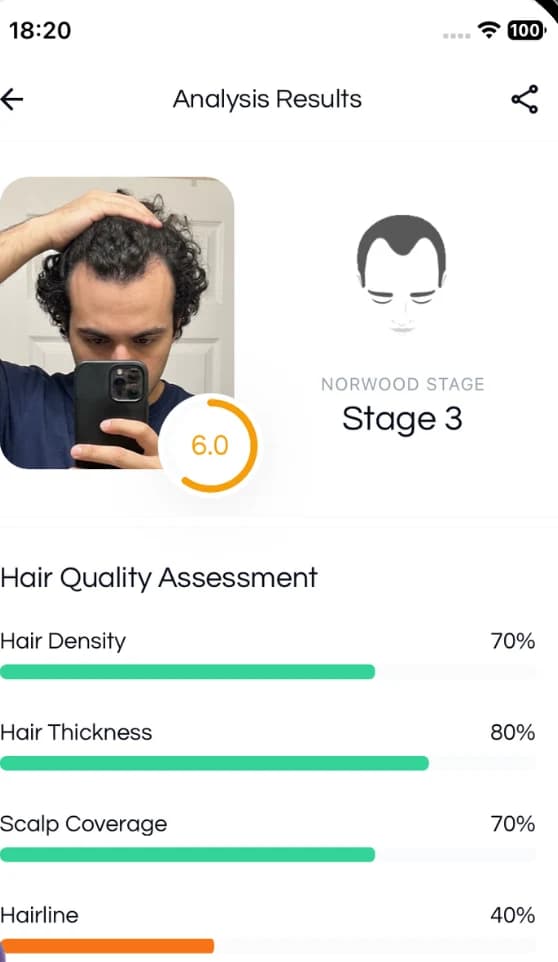
Balding AI is our top pick because it adds 0-10 scoring and history to guided scalp photos. The app records density, thickness, and scalp coverage scores across zones, while its capture guides help you repeat front, side, and crown angles. Scans stay private, and you can export a report to bring to a clinician or delete your data. For anyone who wants a structured record rather than another loose photo folder, this is a practical place to start.
Free · takes 30 seconds
Score your own scalp
Balding AI is free to start. Your first AI score takes about 30 seconds, and you can export or delete everything afterwards.
2. Standalone AI scalp-analysis tools
A handful of single-purpose tools will analyze one uploaded photo and return a density estimate. They can be a useful second opinion, but without guided capture and a longitudinal history they cannot show a trend. A one-time score tells you where you are today, not which direction you are heading, and direction is the only thing worth acting on.
3. General photo-journal and gallery apps
Repurposing a notes or photo app to log your scalp is free and better than nothing. The weakness is consistency. Nothing enforces the same angle or lighting, and you are left comparing images by eye, which reintroduces the bias you were trying to escape. These work as a backup, not as your primary method.
4. Treatment-tracking and reminder apps
Some apps focus on logging when you took finasteride or applied minoxidil rather than measuring results. Adherence tracking is genuinely valuable, since consistency drives outcomes, but a reminder app on its own never answers the question of whether your hair is actually responding. Pair it with a measurement tool.
| Approach | Objective scoring | Guided capture | Trend over time | Best for |
|---|---|---|---|---|
| Balding AI | Yes, 0-10 by zone | Yes | Yes, multi-week | Anyone who wants data, not reassurance |
| Standalone AI tools | Single snapshot | No | No | A quick second opinion |
| Photo-journal apps | No | No | Manual, by eye | A free backup log |
| Reminder apps | No | No | Adherence only | Staying consistent with treatment |
How to use a hair loss tracker app, step by step
- Set a baseline. Before you change anything, capture your hairline, both temples, the crown from above, and your part line. This is your ground truth to compare against later.
- Lock your environment. Use the same room, the same lighting, and roughly the same time of day. Dry, styled hair beats wet hair for consistency.
- Set a weekly cadence. Once a week is plenty. Same day, same conditions. Frequency matters less than repeatability.
- Read the trend, not the day. Ignore single-session dips. Compare your 4-week and 8-week lines to see the real direction.
- Export and share. If the trend declines, send your report to a dermatologist. An organized timeline gives the clinician context without claiming that the app can diagnose the cause.
How to tell if you are balding
You can get a reasonable read at home using three checks, then confirm the direction with tracked photos over time.
Map your hairline against the Norwood scale. The Norwood scale is the standard classification for male pattern hair loss, running from a full hairline through temple recession and crown thinning to more advanced stages. Comparing your own hairline to the scale gives you a rough stage and a vocabulary to describe what you are seeing. A slightly mature hairline in your late teens or twenties is normal; the signal to watch is whether the temples keep creeping back over months.
Check your crown and part line. Vertex thinning is hard to see on yourself, so photograph the top of your head under bright overhead light, or part your hair in the usual spot and compare it to an older photo. A widening part or more visible scalp at the crown points to diffuse thinning across the top.
Track density photos over time. A single photo proves nothing. Density photos captured the same way across 8-12 weeks are the only non-invasive way to separate a real downward trend from normal cycle fluctuation. This is where an objective scoring app pays off, because it reads the change you cannot reliably see.
What to look for in a hair loss tracker app
Objective scoring
Numbers, not vibes. Zone-specific density and thickness scores remove the eye-of-the-beholder problem.
Guided capture
On-screen outlines for each angle so every photo is genuinely comparable to the last.
Trends and export
Multi-week trend lines plus a report you can hand to a dermatologist without re-explaining everything.
Privacy is the quiet fourth requirement. Scalp photos are personal, so choose an app that keeps your scans private and lets you export or delete your data whenever you want.
The bottom line
The best hair loss tracker app is the one that replaces a stressful mirror habit with a calm, repeatable measurement. Balding AI earns the top spot for combining guided capture, objective AI scoring, and progress tracking in one place. Set a baseline, hold your conditions steady, and let eight weeks of data tell you what a single glance never can.
Start tracking with objective scores
Free to start, and your first AI score takes about 30 seconds. Set a baseline, repeat the guided angles, then use weekly scores and photo history to review longer windows.